


Specialized in the sale of robotic products! educational robots, toy robots, connected objects
- Home > News > LEGO Education > LEGO® MINDSTORMS® EV3 : FAQ
LEGO® MINDSTORMS® EV3 : FAQ
LEGO Education
Mindstorms EV3, NXT and EV3 Education : FAQ Robot-Advance
On this page you will find all useful information to start with the robot LEGO Mindstorms EV3, to get to know better the various kits and version and find answers to all your questions! This page may change according to all the questions you may ask us.
Novelties LEGO Mindstorms EV3
- What are the main evolutions of LEGO Mindstorms EV3 in comparison with LEGO Mindstorms NXT?
- Will LEGO Mindstorms EV3 disappear with the new LEGO Mindstorms EV3?
- What are the differences between the LEGO Mindstorms EV3 kit and the LEGO Mindstorms EV3 Education?
Software LEGO Mindstorms EV3
- How to program LEGO Mindstorms EV3?
- What are the available languages in the software LEGO Mindstorms EV3?
- What is the minimal required configuration to run the programming software EV3?
- What are the differences between the softwareEV3 general public (free) and the software EV3 Education (sold separately)?
- Can my NXT brick be programmed with the software EV3?
- Can my EV3 brick be programmed with the NXT software?
- Is it possible to create my own programming blocks with the software LEGO Mindstorms EV3 (education)?
- Can I program my LEGO Mindstorms EV3 (all version) with all the versions of the software EV3 (HOME and EDUCATION)?
- Can I program LEGO Mindstorms EV3 without a computer?
- What are the new functionalities of the software LEGO Mindstorms Education EV3 in comparison with the NXT version?
- Where can I download the software LEGO Mindstorms EV3 for free?
- LME EV3 V1.1 Software update.
Compatibility LEGO Mindstorms NXT/ LEGO MINDSTORMS EV3
- Are my LEGO Mindstorms NXT devices compatible with LEGO Mindstorms EV3?
- Do the sensors LEGO Mindstorms EV3 work with a NXT brick?
- Can my NXT brick be programmed with the EV3 software?
- Can my EV3 brick be programmed with the NXT software?
- Are new connection cables necessary?
Application available in French for iPad
- Where can I download the application EV3?
- What are the main differences between the application EV3 and the software EV3 on computer?
- Is it possible to use the programs created on the application EV3 in the software EV3 on computer?
- Can I update the firmware of my EV3 brick by using the application EV3?
- Are they supports with the EV3 application for teachers?
- Is the application EV3 compatible with the intelligent NXT brick and NXT equipment?
- Is the EV3 application free?
- Why do I need an activation code to use the application EV3?
- Where can I find the activation code of the application EV3?
- On which support is the application EV3 compatible?
- Is the application EV3 also compatible with the iPhone?
- Can I use the curriculum official EV3 packs (conceive engineering projects, project about science…) in collaboration with the application EV3?
Novelties LEGO Mindstorms EV3
1. What are the main evolutions of LEGO Mindstorms EV3 in comparison with LEGO Mindstorms NXT?
The main evolutions of LEGO Mindstorms EV3 are about the EV3 intelligent brick:
- More powerful processor
- More buttons and light indicators
- 4 motor ports (3 on the NXT brick)
- Port for micro SD card
- USB Host port
- Embedded system: Linux
- Possibility to control the intelligent brick with a smartphone/iOS or Android tablet.
A lot of novelties are in the software. See in the EV3 software section EV3 software section for more details
2. Will LEGO Mindstorms EV3 disappear with the new LEGO Mindstorms EV3?
No. The range LEGO Mindstorms NXT (in only the EDUCATION version) will still be supported by LEGO EDUCATION for two years after the date of release of EV3 (August 2013).
3. What are the differences between the LEGO Mindstorms EV3 kit and the LEGO Mindstorms EV3 Education?
LEGO Mindstorms EV3 (Home) kit is more about toy robot than robotics. So the LEGO Technic sensors and pieces are not the same than in the EV3 Education kit. The software is free but without the functionalities that may interest a teacher. And finally, the LEGO Mindstorms EV3 battery is not in the kit.
Sensors and actuators in the LEGO EV3 Home Kit:
- 2 motors L, 1 motor S
- 1 EV3 contact sensor, 1 EV3 color sensor, 1 EV3 infrared sensor, 1 EV3 infrared beacon
LEGO Mindstorms EV3 Education kit
This kit is for teachers. In comparison with the LEGO Mindstorms EV3 Home kit, it has more LEGO Technic pieces and a rechargeable battery (charger non-included). The software is sold separately. The infrared actuator is replaced with an additional contact sensor as well as a gyroscopic sensor.
Sensors and actuators in the LEGO EV3 Education kit
- 2 motors L, 1 motor S
- 2 contact sensors, 1 color sensor, 1 ultrasound sensor and 1 gyroscopic sensor
The construction models vary from one kit to another. They are digitally included in the proper software.
Software LEGO Mindstorms EV3
1. How to program LEGO Mindstorms EV3?
LEGO Mindstorms EV3 can be programmed with the LEGO Mindstorms EV3 software in its Home or Education version. It is also programmable with LabVIEW and RobotorC? Thanks to its Linux firmware and the community build around, LEGO Mindstorms EV3 can be open to any kind of languages of programming.
2. What are the available languages in the software LEGO Mindstorms EV3?
- English (US/UK)
- Danish
- Norwegian
- Swedish
- German
- French
- Italian
- Portuguese
- Korean
- Japanese
- Chinese
- Russian
- Arabic
3. What is the minimal required configuration to run the programming software EV3?
The software EV3 (HOME and EDUCATION) is compatible with PC and Mac. Below, the minimal required configuration is:
- OS (PC): Windows XP, Vista, Windows 7, Windows 8 32bits/64 bit. Not compatible with Windows 8 RT.
- OS (Mac): Mac OS 10.6, 10.7, 10.8
- CPU: 1.5 GHz and more
- RAM: 2Go and more
- Minimum memory on hard drive: 700 Mo minimum
- Resolution: 1024 x 760
- USB port: 1
4. What are the differences between the softwareEV3 general public (free) and the software EV3 Education (sold separately)?
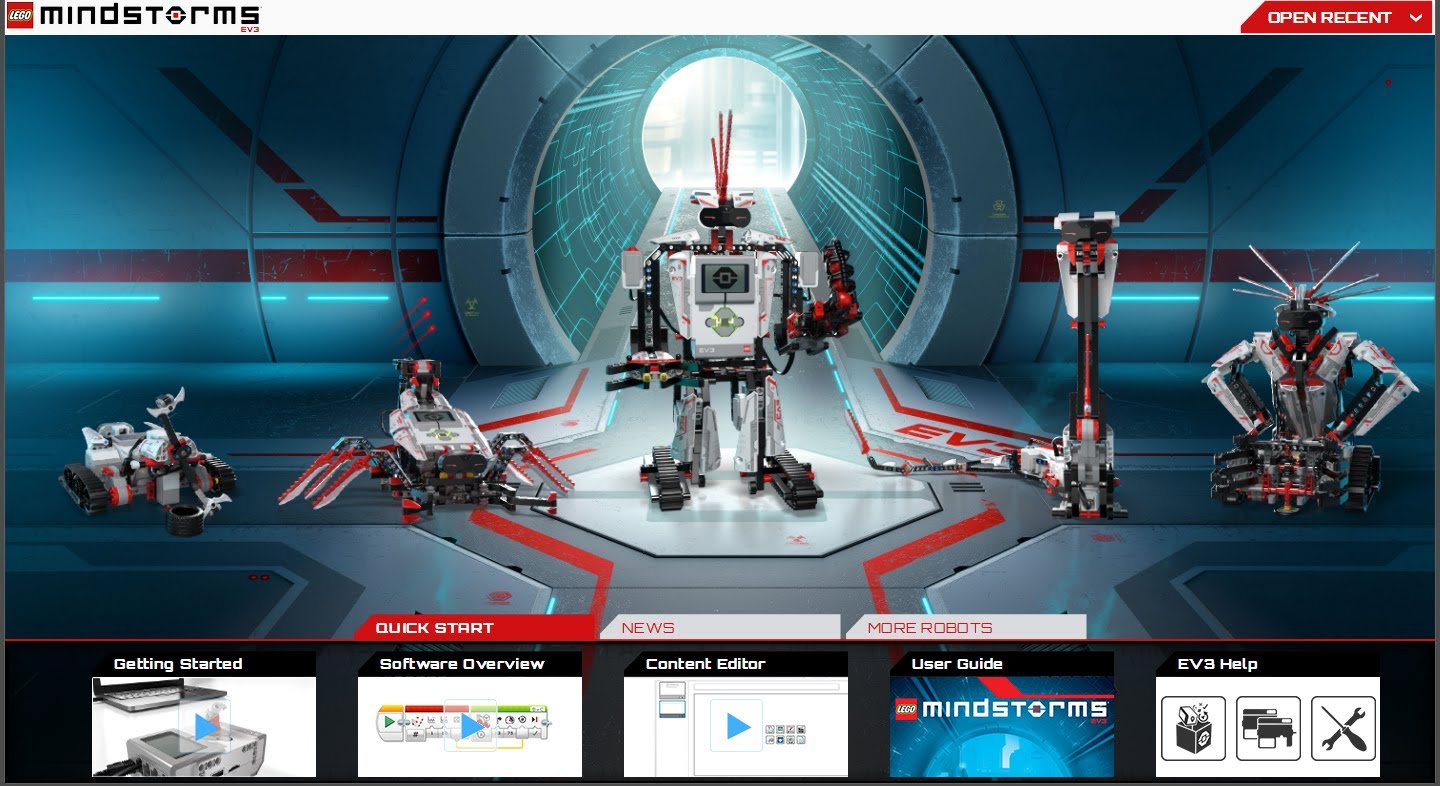
The EV3 Home software is more about games. The programming of the robot is of course possible with the software but the other functionalities are more about the playful and communal part. The Lobby (home page) goes in that direction.
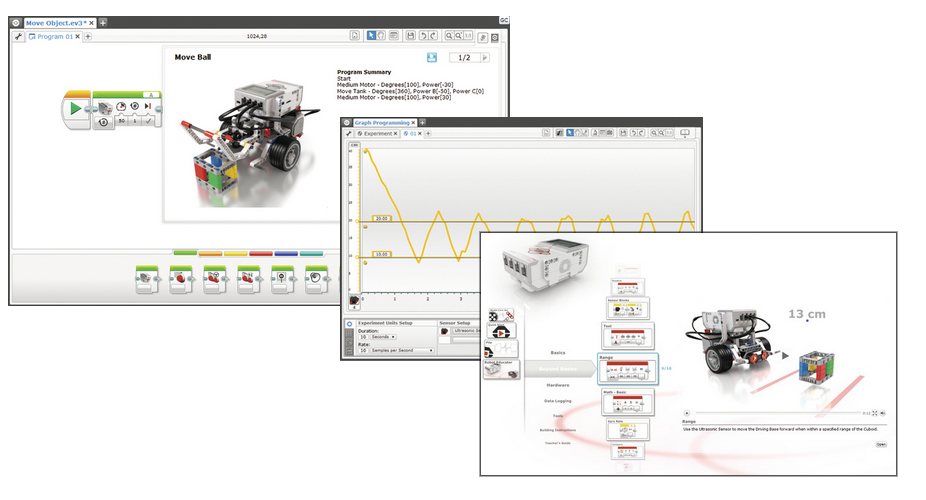
The software EV3 Education is more about the pedagogical aspect of the LEGO robot. The Lobby is clear and refined. But the content is really different. The software EV3 Education offers LEGO practical exercises directly in the software. It also has a digital assistant that will you guide you, you and your students in the discovery of robotics. It also has a data editor that can integrate directly all text data and all media directly in the student program. The teacher can also interact with the content by using his teaching interface. Finally, the functionalities of the data logging but also their processing (application of mathematical formulas to a curve) and export (text or spreadsheet) are in this version.
5. Can my NXT brick be programmed with the software EV3?
Yes. However be careful, once an NXT program imported in the EV3 software, it is impossible to go back on a NXT version.
6. Can my EV3 brick be programmed with the NXT software?
No. A lot of changes happened between the 2 versions of software; included the replacement of the firmware LEGO with a modified version of the operating system Linux. The programming of the EV3 brick with the NXT software is impossible.
7. Is it possible to create my own programming blocks with the software LEGO Mindstorms EV3 (education)?
Yes, this functionality is called “My blocks” and is already available in the EV3 software for general public. For users creating their own hardware, a SDK will be soon available.
8. Can I program my LEGO Mindstorms EV3 (all version) with all the versions of the software EV3 (HOME and EDUCATION)?
Yes, the programming of a LEGO Mindstorms EV3 is possible with the two versions of the software HOME and EDUCATION, no matter the type of kit. However some functionality will not be able to be exploited. For example, Robot Educator, software EV3 Education version) can be exploited only with a LEGO Mindstorms EV3 Education kit, the general public kit does not have the right pieces. The models of robots included in each version of the software also need the corresponding kit.
9. Can I program LEGO Mindstorms EV3 without a computer?
Yes, it is possible to program LEGO Mindstorms EV3 directly from the intelligent brick 3V3. The programming function “on brick” was greatly improved and it is now easy to program basic tasks but also do a data logging. All programs created from the intelligent brick EV3 can be imported in the LEGO Mindstorms EV3 software from the software you can improve and make them more complex easily an existing program.
10. What are the new functionalities of the software LEGO Mindstorms Education EV3 in comparison with the NXT version?
The LEGO Mindstorms EV3 software (Education version) has a lot of novelties:
- Content Editor - a notebook of virtual projects is integrated in the LEGO Mindstorms EV3 Education software. Students can write, add images, sounfs and videos directly from the notebook. The teacher as its own interface to interact with all project notebooks of his students, answer them or even lead them into a direction without quitting the software.
- Robot-Educator - 48 step by step tutorials to discover robotics and the basic principles with Robot-Educator, your new virtual assistant.
- Improving of Data Logging: an exportation function of spreadsheets, possibility to stock values in boards and apply formulas. Programming of the robot according graphic trends.
- Design engineering projects - add easily new practical exercises to your lessons thanks to Design Engineering Projects! Projects that can be made in class, thought and designed by LEGO Mindstorms EV3 which will require your student mathematical and scientific knowledge.
.
11. Where can I download the software LEGO Mindstorms EV3 for free?
You can download for free the LEGO Mindstorms EV3 software HOME version on the official LEGO website or direclty on Robot-Advance.
12. LME EV3 V1.1 Software update.
- Bug solving:
• Missing description of My Block fix in the contextual help
• Improving of annotations on the programming web
• Improving of support for big images in the content editor
• Improving or Wi-Fi support
- New functionalities:
• Editor of content before printing: possibility to print all content pages
• Block comment: permits to write and insert comments directly in the program code.
• Moving the comment tags of the teachers: possibility to move easily the comment of the teachers around the content editor.
- Silverlight installation:
• Addition of an internet link with repair information when a corrupted element is detected.
• Support activated for Mac files sensitive to break
- Included new EV3 v1.06E firmware
Why are the updates not installed automatically?
To activate automatic update, you need to go in the menu “help” and click ono “check the updates”. A window opens and you need to tick the box “activate”.
Why is there no link when the window appears when an update is detected?
This means that you are using the version 1.0.0 of the LME EV3 software. To get the link, you need to go on the Lego Education website in the Mindstorms section and follow the update instructions: www.LEGOEducation.com/MINDSTORMS
What’s the version of the software you are currently using?
To know what version of the software you are using, you need to go in the help menu and click on “about LEGO Mindstorms EV3”. In the window appearing you will find the version number.
Is it possible to install the update V1.1 without knowing which LME EV3 software pre-installed?
No, the patch of the update V1.1 requires that the software LME EV3 is already installed.
Is it possible to check manually the upgrades of the software?
Yes, you need to go in the help menu and click on “check software updates”.
Will each version of my software be updated if I installed several languages?
No, only the active version will be upgraded. All versions will be erased. To re-install them you need to go on the LEGO Education in the LERO section and access the installation files thanks to your ID or LERO link.
How can I see what are the languages activated with my software?
You need to go in the menu Edition and click on “change language”. A drop down menu of installed languages will appear.
Compatibility LEGO Mindstorms NXT/ LEGO MINDSTORMS EV3
1. Is my LEGO Mindstorms NXT equipment compatible with LEGO Mindstorms EV3?
- LEGO MINDSTORMS EV3 has the same pieces than LEGO Technic and RJ12 connectors than the LEGO MINDSTORMS NXT has. Also, all sensors, motors and construction pieces NXT are compatible with EV3.
- The battery charger is compatible NXT/EV3.
- The rechargeable battery NXT is NOT compatible with the intelligent EV3 brick and vice versa.
2. Do the sensors LEGO Mindstorms EV3 work with a NXT brick?
No, the NXT brick is not able to read EV3 sensors. EV3 sensors are made to communicate with the intelligent EV3 brick whom firmware (included software) is now based on embedded Linux.
3. Can my NXT brick be programmed with the EV3 software?
Yes, the intelligent programmable NXT brick can be programmed since the new LEGO MINDSTORMS Education EV3 software! Not all functionalities of the software are supported by the intelligent NXT brick.
4. Can my EV3 brick be programmed with the NXT software?
No, the firmware differences make impossible the programming of an EV3 intelligent and programmable brick with the NXT software.
5. Are new connection cables necessary?
No, LEGO MINDSTORMS Education EV3 cables are the same as the NXT cables (RJ12 format).
Application available in French for iPad
The software LEGO MINDSTORMS EV3 Education has now included the application in French to program your robot with an iPad.
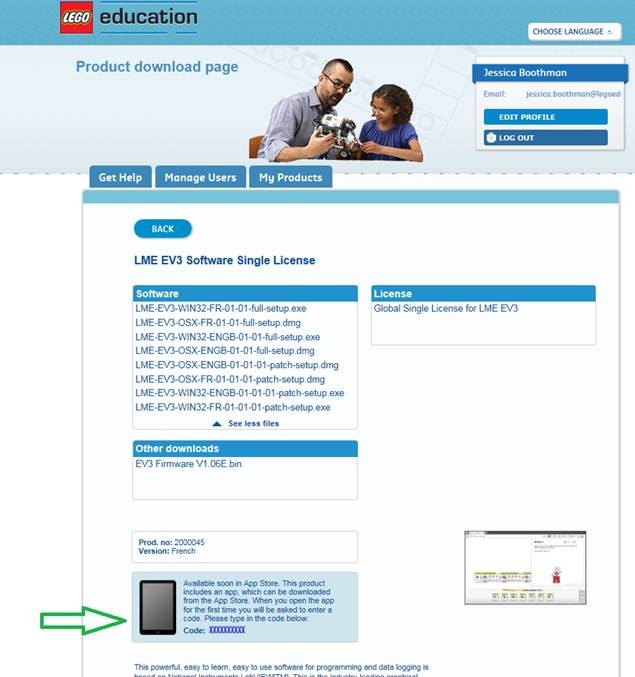
You have a free access to this application in case you have already the software LME EV3 2000045 or 2000046. The code to download the application in the App Store is in LERO.
You just need to connect with your id and find the software product LME EV3, then note the code (to use in the App Store).
Click here to get the application.
1.Where can I download the application EV3?
Open your iTunes account and look for “Lego Education” or “EV3”. You will find several application, you just need to click on the one where the LEGO Education logo appears.
2. What are the main the application EV3 and the software EV3 on cumputer ?
The application EV3 has only the more used programming blocks such as the action blocks and control blocks.
There is no graphic environment where you can predict, collect and analyze data from the sensors.
The application EV3 has no digital book or content editor where the students can document their conclusions and the teachers can modify or create content.
3. Is it possible to use the programs created on the application EV3 in the software EV3 on computer ?
Yes, even if the file format for the EV3 software and the EV3 application are different.
You can export the programs of the application EV3 in the EV3 software on computer and continue working on it.
However, you cannot share programs created on the EV3 software on computer with the EV3 application.
4. Can I update the firmware of my EV3 brick by using the application EV3 ?
No, there is no tool to upgrade the firmware with the EV3 application. To upgrade the firmware of your EV3 brick, you need to use the update tool of the firmware in the EV3 software on your computer.
5. Are they supports with the EV3 application for teachers ?
Yes, inside the application EV3 there are 3 PDF documents that help teachers with LEGO Mindstorms EV3:
- The Teacher introduction document briefly describes the EV3 application and gives advices for class utilization.
- The lesson summary gives instructions on how give an introduction lesson on robotics.
- The user guide gives a general introduction about the global idea of EV3, included the description of each material component and software possibilities.
6. Is the application EV3 compatible with the intelligent NXT brick and NXT equipment ?
Yes and no. The application EV3 cannot communicate with the NXT brick. However the NXT sensors and NXT motors used with the EV3 brick can be programmed the same way EV3 sensors and motors are by using the application.
7. Is the EV3 application free ?
The application EV3 is given with the LEGO Mindstorms Education EV3 sensor and requires an activation code after the purchase of the software. The activation code is given on the connection on the LEGO Educational Resources website (www. LEGOeducation.com/LERO) when you purchase the kit and basic software.
8. Why do I need an activation code to use the application EV3 ?
The application EV3 is given with the LEGO Mindstorms EV3 Education software as an alternative solution to programming by using computers based on Mac or Windows.
When you buy the EV3 software, you will have access to the activation EV3 code.
9. Where I can the code of the EV3 application ?
You can find it on the LEGO Educational resources website (www.LEGOeducation.comm/LERO) where you can also download the EV3 software.
To log in the website, use your LEGO ID or the registering information given when you purchased the EV3 software. Click on the link of the software in the email sent with your activation code.
10. On which support is the EV3 application compatible ?
The application EV3 is today only available for Apple IPads. Requires iOS 8 or above. The compatibility for Android is planned for 2016.
11. Is the EV3 application also compatible with the iPhone ?
No, the soft is designed to be an experience on tablet given the screen size.
12. Can I use the curriculum EV3 packs (engineering project science,...) in collaboration with the EV3 application ?
No, none of the EV3 curriculum EV3 packs are compatible for now with the EV3 application. A major part of the programming functionalities and the data recording required for packs are for now not supported by the EV3 application.


